



















Uninstall Windows 11 KB5074109 to Resolve Outlook POP, PST Issues

If you’re experiencing issues with Outlook Classic freezing or becoming unresponsive while using POP accounts or handling PST files, you may need to uninstall Windows 11 KB5074109. This update, released on January 13, 2026, has been identified as causing significant problems for users. Outlook Classic users should be particularly aware, as the update directly impacts functionality.
Impact of Windows 11 KB5074109 on Outlook Classic
The Windows 11 KB5074109 update has been linked to various complications, especially with the Outlook Classic application. When users utilize POP (Post Office Protocol) accounts, Outlook relies on PST (Personal Storage Table) files to manage offline emails. If these PST files are saved in OneDrive-synced folders, conflicts can arise, leading to unresponsive behavior in Outlook.
Common Issues Reported
- Outlook freezes upon exit due to PST file locking by OneDrive.
- Sent emails may not appear in the ‘Sent Items’ folder.
- Users often encounter a ‘Not Responding’ status, requiring a forced closure.
Uninstalling Windows 11 KB5074109
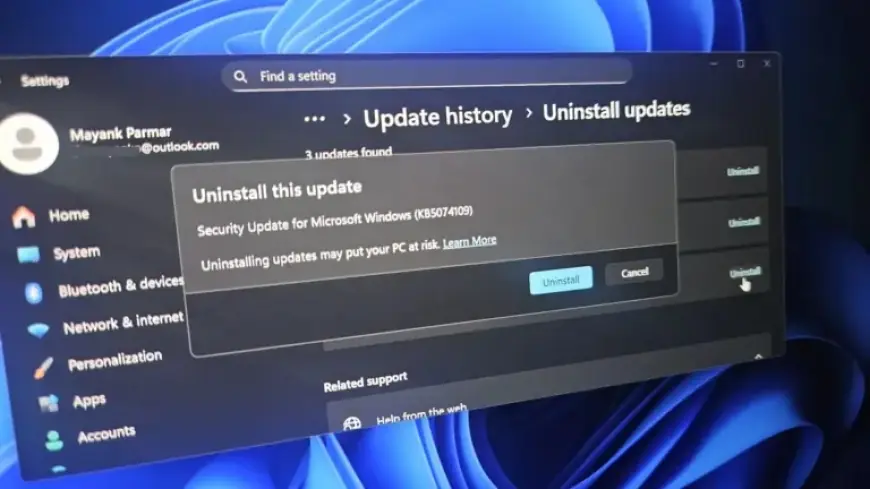
To restore functionality in Outlook Classic, follow these steps to uninstall the troublesome update:
- Open Settings from the Start menu.
- Select Windows Update, then click on Update history.
- Look for KB5074109 and click on “Uninstall.”
- Confirm your action by clicking Uninstall again.
Upon removal, Windows will reboot automatically. Remember to pause future updates to avoid the same issues.
Additional Complications
Besides Outlook issues, the update has caused other problems within Windows 11:
- Black screens appearing during startup.
- Desktop wallpaper resets and customization loss.
- Sleep mode (S3) malfunctioning on older PCs.
- File Explorer failing to apply custom folder names.
While not all users have experienced these issues, they are prevalent enough to warrant caution. Microsoft acknowledges the problems associated with KB5074109 and suggests using webmail as an interim solution.
Conclusion
If you rely on Outlook Classic and have encountered issues since the January 2026 update, uninstalling Windows 11 KB5074109 may be necessary to restore its functionality. Stay informed about updates from Microsoft as they work on a resolution for these ongoing problems.