
















Fire Tv Mobile App New Features Turn Your Phone Into a True Second Screen — Who Benefits First

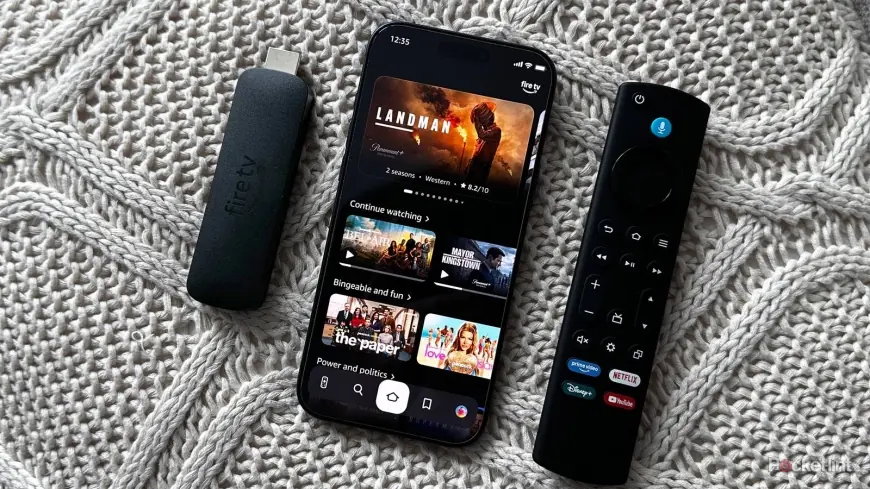
The Fire Tv Mobile App New Features rollout matters most to phone-first viewers and owners of newer Fire TV hardware: the update converts the long-standing backup remote into a full second-screen experience that can browse, queue and launch TV content. The redesign arrives after a CES 2026 preview and a US interface rollout, and it’s being distributed across key international app stores now.
What the Fire Tv Mobile App New Features mean for phone-first viewers
Here’s the part that matters: if you used the mobile app mainly as a backup remote, this free upgrade changes that dynamic. Your phone can now do the discovery and queuing that previously required navigating the on-screen interface. For users who prefer scrolling on a handset, the update hands over the heavy lifting—searching, adding to watchlists and launching titles can all start on the phone and continue on the TV.
How this update links to the recent Fire TV redesign
The mobile app refresh follows a two-part product push teased at CES 2026 in January: a complete redesign of the TV interface and a long-overdue revamp of the free iOS and Android app. The redesigned TV UI began rolling out in the US last week, bringing a cleaner look, improved layouts and smoother performance. That rework was the reason for the app overhaul—the new phone experience adopts the same visual language and navigation changes introduced on TV.
What actually changed inside the app and the TV UI
Until now the app functioned primarily as a backup remote. The update makes it a second-screen discovery tool: you can browse the same content shown on your TV, manage your watchlist and launch titles directly from your phone so they begin streaming when you return to the TV. The TV redesign shifts the navigation bar from the middle to the top of the screen and adds a new home screen that lets users pin up to 20 frequently used apps, up from a previous limit of six. The visual overhaul emphasizes improved layouts, rounded corners, updated color gradients and typography, and tighter spacing—design choices that have been carried into the mobile app’s interface.
Rollout, availability and device limits
The updated mobile app is rolling out on Android and iOS in the UK, Germany, France, Italy, Spain, Japan and India. The update is already live on the US App Store, but the new features will become available gradually over the next weeks, so updated app installs may not show changes immediately. If you do not yet see the interface changes after updating, waiting is advised. The mobile app remains free to download on the App Store and Google Play Store. The redesigned Fire TV interface itself is currently limited to US users on specific hardware: the Fire TV Stick 4K Plus, the Fire TV Stick 4K Max (2nd Gen) and the Fire TV Omni Mini-LED Series. Expansion to more devices and additional countries is planned later this spring.
Practical implications, affected users and early signals
- Phone-first discovery becomes the primary path for casual browsing and watchlist management for mobile app users.
- Users with the listed US devices will see the redesigned TV UI first; others should expect broader availability later this spring.
- App updates are live in multiple international app stores now; full feature activation may roll out gradually over the next weeks.
- Seeing the app behave like an extension of the TV is an early signal that future TV interface changes will mirror the mobile experience.
If you’re wondering why this keeps coming up, it’s because the mobile update and the TV UI are two halves of the same design push: the company rebuilt the on-screen layout and then aligned the app to match that experience. The real test will be how seamlessly queued items and watchlists sync between phone and TV for everyday users.
What’s easy to miss is the jump in pinned apps from six to 20 on the TV home screen—a small change that can reshape how people prioritize streaming services on first glance. That shift, combined with mobile-driven discovery, nudges the experience away from remote-first navigation toward phone-led content choices.
Writer’s aside: rollout windows vary by region and device, so patience will be necessary for those who update early but don’t see new features immediately. Recent coverage indicated staged availability, and details may continue to evolve.