

























Raspberry Pi OS Enhances USB Gadget Mode Support

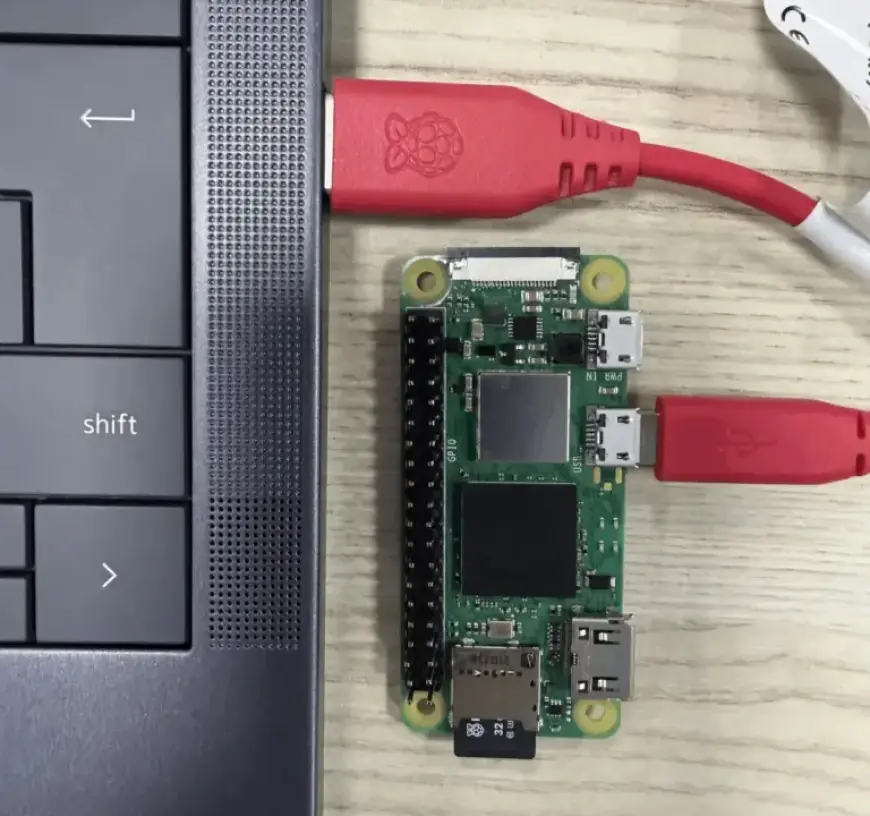
Raspberry Pi OS Trixie has officially enhanced its USB gadget mode support, enabling users to connect their Raspberry Pi devices directly via USB without a router. This feature is particularly useful for establishing connections over IP.
Overview of the USB Gadget Mode
The introduction of the rpi-usb-gadget package in Trixie images dated October 20, 2025, simplifies previous methods. Earlier attempts at using USB gadget mode involved complex scripts and manual setups. Now, the process is streamlined and user-friendly.
Key Features of USB Gadget Mode
- The Raspberry Pi appears as a USB Ethernet device when connected to a PC.
- Users can SSH into their Raspberry Pi using the hostname configured in Raspberry Pi Imager.
- If the PC has internet access with Internet Connection Sharing (ICS) enabled, the Raspberry Pi automatically receives internet connectivity.
- A lightweight background service manages network modes between standalone and ICS-backed networking.
Compatibility and Requirements
This feature functions on Windows, macOS, and Linux. However, effective operation depends on the specific Raspberry Pi model and USB port capabilities. Here’s a breakdown:
| Raspberry Pi Model | USB Port to Use |
|---|---|
| Raspberry Pi Zero, Zero W, Zero 2 W | Micro USB port closest to HDMI (not ‘PWR IN’) |
| Raspberry Pi 4, 5, 500, 500+ | USB-C port directly on the board |
| Compute Module 5 | USB-C port on the Raspberry Pi CM5 IO Board |
| Compute Module 4 | Requires additional manual setup; not auto-configured |
Once gadget mode is active on models that support it, the OTG port will only function as a USB Ethernet connection, disabling regular USB peripheral interactions.
How to Enable USB Gadget Mode
Enabling USB gadget mode can be easily done through Raspberry Pi Imager 2.x when flashing the image. For those with existing Trixie installations, the following commands should be executed:
sudo apt update
sudo apt install rpi-usb-gadget
sudo rpi-usb-gadget on
sudo reboot
This implementation is open-source, with the code available on GitHub, promoting further community collaboration and development.
Conclusion
The enhanced USB gadget mode support in Raspberry Pi OS Trixie marks a significant improvement for users. It simplifies network connections and removes the need for complicated setups. As this feature continues to evolve, it sheds light on the growing capabilities of Raspberry Pi devices.