





















Google Chrome Introduces Vertical Tabs and Enhanced Full-Page Reading Mode

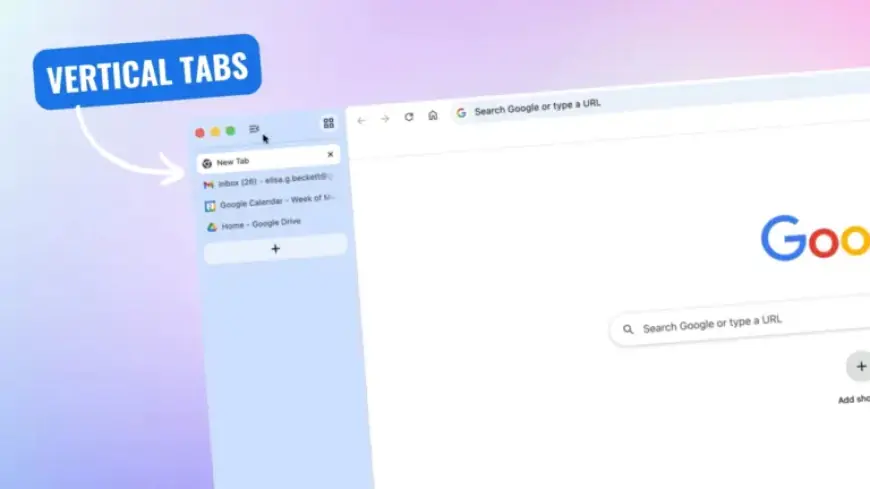
Google has officially introduced two highly anticipated features in the latest stable version of Chrome: vertical tabs and an enhanced full-page reading mode. These updates aim to improve user productivity and overall browsing experience.
Vertical Tabs: A New Organizational Tool
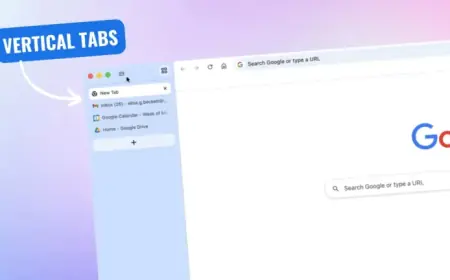
The vertical tabs feature allows users to manage their browser tabs more efficiently. Instead of the traditional horizontal tab strip, users can now stack their tabs on the left side of the Chrome window.
- To activate this feature, right-click any Chrome window and select “Show Tabs Vertically.”
- This change maximizes vertical screen real estate, which is precious on widescreen displays.
- Users can easily read full page titles and organize their tab groups with this layout.
- For a minimalist setup, the sidebar can even be reduced to display only favicons.
Enhanced Full-Page Reading Mode
Alongside vertical tabs, Chrome’s reading mode has received a significant upgrade. Now, it offers a fully immersive full-page interface.
- Previously a side panel, the reading mode now strips clutter from webpages.
- Users can activate it by right-clicking on a webpage and selecting “Open in reading mode.”
- The updated mode removes ads and other distractions, providing a focused reading experience.
Impact on User Productivity
The introduction of vertical tabs and enhanced reading mode represents a substantial step forward in Chrome’s functionality. These features align Chrome’s capabilities with those of its leading competitors.
These updates are rolling out to the desktop version of Chrome starting today. For users who do not see the changes immediately, ensuring the browser is updated via Settings > About Chrome is recommended.
As more users adopt the vertical tab feature and enhanced reading mode, Chrome aims to become a more efficient tool for browsing and information consumption. Will you make the switch to vertical tabs or continue with the traditional layout? Share your thoughts in the comments on Filmogaz.com.