




















Preview Android’s ‘Tap to Share’ Feature for Contacts and File Sharing

Google is set to unveil a new feature called “Tap to Share” for Android devices. This innovative function aims to streamline the sharing process between Android phones, reminiscent of earlier features like “Android Beam.” Although Android Beam was discontinued, its legacy continues through the Quick Share feature.
What is the “Tap to Share” Feature?
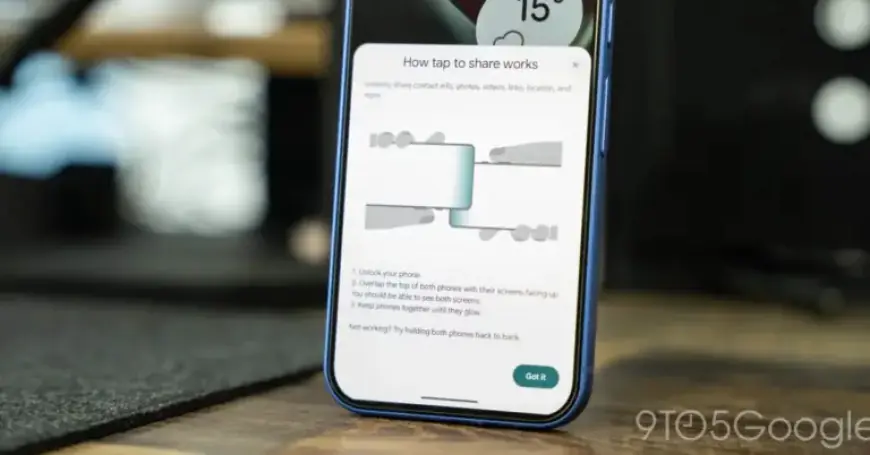
Recent updates have introduced a preview of the “Tap to Share” capability, revealing how it operates. This functionality allows users to share contact information, photos, videos, links, and locations with a simple touch of devices.
How Does It Work?
The feature includes a pop-up explanation detailing the sharing process:
- Unlock your phone.
- Align the top of both phones with their screens facing up.
- Hold the devices until they glow.
- If not working, try placing them back-to-back.
This glowing animation indicates successful interaction between the devices, although the feature is not fully operational yet.
Integration and Compatibility
It appears “Tap to Share” integrates into the existing Android share sheet. Users must have relevant content open for sharing, similar to the functionality seen in Apple’s “NameDrop.” Evidence suggests that Samsung devices will support sharing contact cards through this feature.
Considerations for Android Users
While the pop-up functionality was tested on a Pixel device, it seems primarily designed with Samsung users in mind. The layout and design reflect this focus. However, the feature is expected to roll out across various Android devices.
One critical aspect included in Google’s pop-up is a troubleshooting guide. This is important because NFC hardware locations vary among Android models. While some brands, like Samsung, place NFC sensors at the top, others position them differently, which can lead to sharing challenges.
Future Outlook
As with any feature in development, it is unclear when or how “Tap to Share” will be fully launched. The current preview provides a promising look at what could enhance the Android user experience significantly.