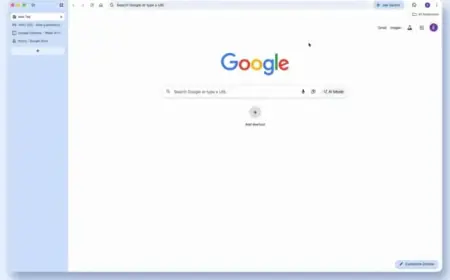

























Chrome Introduces Long-Awaited Vertical Tabs Feature

Google Chrome is set to introduce a long-awaited vertical tabs feature. This update allows Chrome users to view their tabs vertically, making it easier to manage and identify multiple open tabs. The decision comes after years of resistance, influenced by growing competition from other modern browsers.
Introduction of Vertical Tabs
On Tuesday, Google announced the rollout of vertical tabs. This feature allows users to enable vertical tab orientation by right-clicking on the Chrome window and selecting “Show Tabs Vertically.” Once activated, vertical tabs will become the default setting until the user opts to change it. The new arrangement enhances the ability to read full page titles and efficiently manage tab groups.
Enhanced User Experience
Vertical tabs are designed primarily for power users and researchers, who often juggle numerous tabs simultaneously. This configuration helps alleviate the common issue of locating specific tabs when they become crowded, especially with multiple tabs opened from the same website.
- No hard limit on the number of open tabs, apart from hardware constraints.
- Vertical tabs operate similarly to horizontal tabs, allowing for different windows with unique tab groups.
Accompanying Features and Updates
Alongside the introduction of vertical tabs, Chrome will also launch a refreshed Reading Mode. This mode focuses on offering a distraction-free reading experience, allowing users to reduce on-screen clutter. This change addresses concerns over increasingly crowded web pages, particularly on news sites laden with advertisements.
Influence of Competition
Chrome’s decision to include vertical tabs is a clear response to recent developments in competing browsers like Arc and others from AI developers. The availability of vertical tabs reflects how user demand is shaping browser features and interface design.
Gradual Rollout and Future Updates
Google reports that the vertical tabs feature will roll out gradually across various markets. The company has also been active in implementing other important updates recently, including:
- Gemini AI integration
- Improvements to autofill functionality
- Introduction of a Split View mode
These enhancements come at a time when Google is adapting to the evolving digital landscape, marked by the rise of AI and alternative browser options. As Chrome continues to innovate, users can expect more features aimed at improving their browsing experience.