

























Windows 11 2026: Exciting New Features Beyond AI Copilot

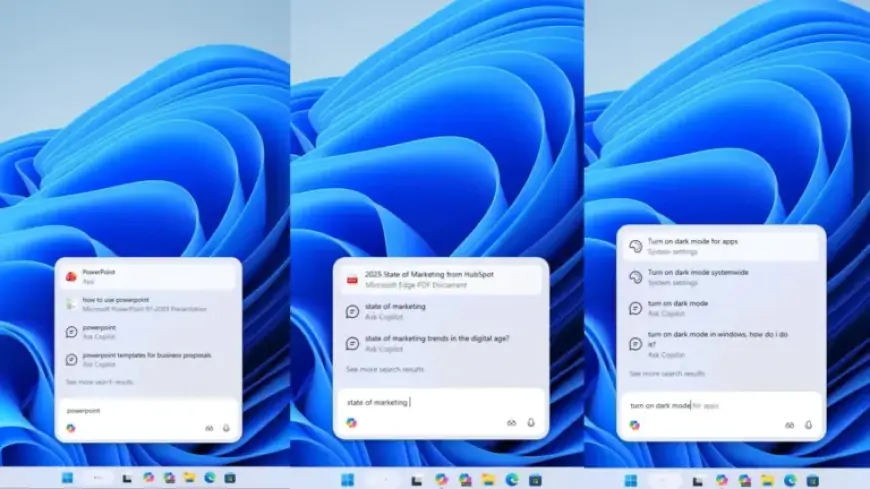
Windows 11 is continuously evolving as part of a regular service model. A significant update is anticipated later this year, introducing various exciting features. This update promises to enhance user experience through a refined Windows Search, an updated Properties tab in File Explorer, a streamlined right-click menu, and a modernized version of Windows Run.
Upcoming Features in Windows 11
The enhancements aim to address user feedback and improve overall functionality. Key features include:
- Ask Copilot for Windows Search: A new search experience powered by Copilot aims to enhance search performance while decluttering the interface.
- Decluttered File Explorer Context Menu: A redesigned right-click menu aims to streamline options and enhance usability.
- Modern Windows Run: A modern version of the Windows Run feature is being introduced to align with the Windows 11 aesthetic.
- Dark-Themed Properties Tab: A new dark theme for the Properties tab in File Explorer aims to enhance visual coherence.
- Agenda View in Notifications Center: The Outlook agenda feature returns, now integrated with Copilot for an enhanced experience.
- Copilot in File Explorer: An anticipated feature where Copilot may directly assist users within File Explorer could streamline file management.
1. Ask Copilot for Windows Search
The Ask Copilot feature replaces the existing Windows Search. It provides a more intuitive search experience by understanding user intent better than traditional search. Users can access this feature from the taskbar, though it must be enabled through Settings. Ask Copilot also allows users to interact with system settings through simple queries.
2. Decluttered File Explorer Context Menu
The right-click menu has long been a source of frustration for users. Microsoft is working on simplifying this menu by hiding less frequently used options in submenus. For example, options related to file management will be consolidated under a “Manage file” category, enhancing both appearance and functionality.
3. Modern Windows Run
The Windows Run feature retains its legacy design but is set for an upgrade. Users will soon be able to enable a modern version that features a contemporary interface consistent with Windows 11’s overall aesthetic. This new version aims to provide additional functionality while keeping the legacy version for traditional users.
4. Dark-Themed Properties Tab
A dark-themed Properties tab within File Explorer has been spotted in internal builds. Though not officially confirmed, this update aims to improve consistency across the Windows 11 interface.
5. Agenda View in Notifications Center
The upcoming update will reintegrate the Outlook agenda feature into the Windows 11 Notifications Center. This return will allow users to view their agendas easily and manage meetings with real-time synchronization.
6. Copilot Integration in File Explorer
Future updates may introduce Copilot directly into File Explorer. This integration could enhance file management and allow users to perform tasks without leaving the Explorer interface.
These upcoming features showcase Microsoft’s commitment to improving the Windows 11 experience. Users are encouraged to stay informed and provide feedback as these changes roll out in the near future. For more updates and detailed insights, visit Filmogaz.com.