iOS 26.2 Resolves Liquid Glass Issue: Here’s How

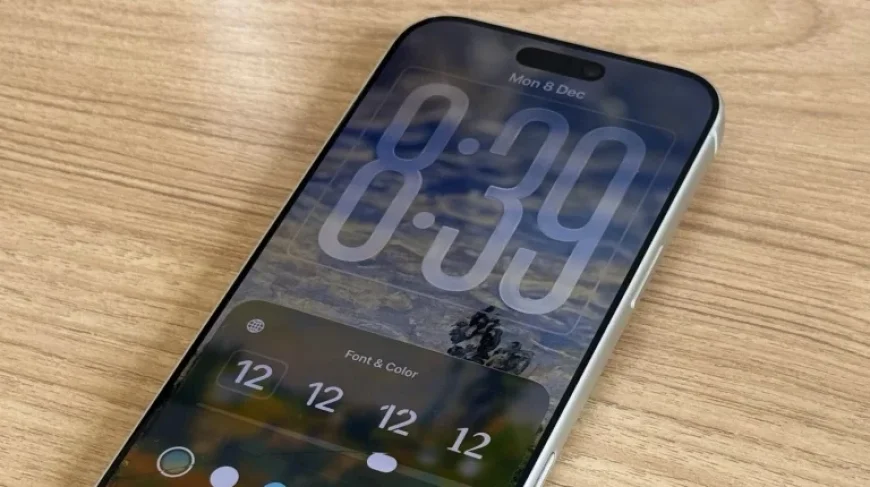
Apple’s iOS 26.2 update marks a significant enhancement in user experience, particularly addressing the Liquid Glass feature introduced in the previous version. The update aims to resolve the issues users faced with Liquid Glass by offering improved aesthetics and usability.
Enhancements in iOS 26.2
iOS 26.2 presents notable revisions compared to its predecessor, focusing on improving both design elements and functionality. Users can expect a more refined interaction with the Liquid Glass interface.
Refined Liquid Glass Aesthetics
The Liquid Glass feature has been adjusted to better reflect Apple’s vision. The enhancements include:
- Skeuomorphic icons that enhance visual appeal.
- Improved balance between the glassy appearance and text readability.
These changes came after feedback during the iOS 26 beta cycle, where initial designs did not meet user expectations.
Improved Readability Options
One of the key improvements in iOS 26.2 is the enhanced readability of the Lock Screen Clock. Users can customize their experience through:
- New “Glass” and “Solid” options for the Lock Screen Clock.
- Accessing these options by long-pressing the wallpaper, tapping Customize, and selecting the Clock.
This customization aims to align better with individual wallpaper designs, making the Liquid Glass more legible.
Transparency and Contrast Settings
Further enhancements allow users to adjust the transparency of the Liquid Glass feature. To manage these settings, users can:
- Navigate to Settings > Accessibility > Display & Text Size to reduce transparency.
- Go to Settings > Display & Brightness > Liquid Glass to switch from “Clear” to “Tinted.”
The “Tinted” mode is particularly beneficial as it increases opacity and adds contrast, thereby improving overall readability.
Conclusion
With iOS 26.2, Apple has responded to user feedback and refined the Liquid Glass experience. Users who previously struggled with readability should explore the customization options to enhance their interaction with the operating system. By adjusting the transparency and selecting preferred clock styles, they can create a personalized, more accessible interface.