























Google Pixel’s Free Productivity Tool Outshines Camera and AI Features

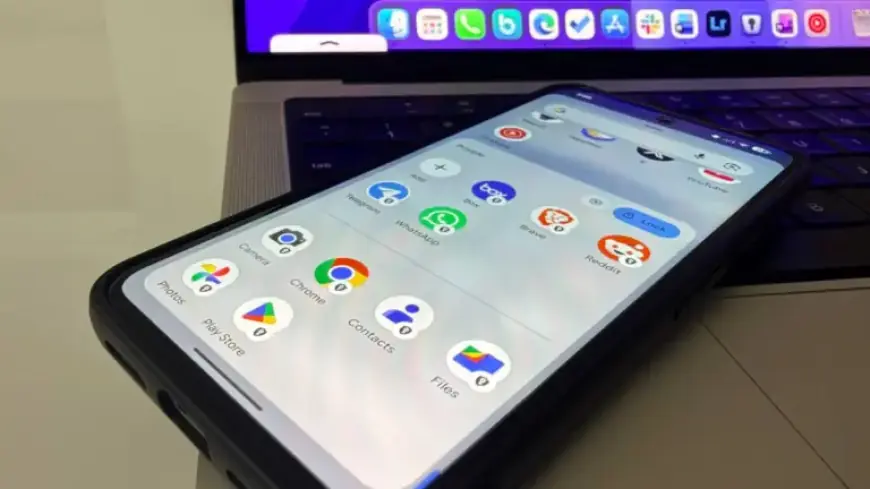
In today’s digital age, smartphones have transformed from mere communication devices to essential productivity tools. Google Pixel’s latest feature, Private Space, is gaining attention for its unique productivity capabilities, surpassing the device’s popular AI and camera functionalities. This often-overlooked feature enhances user experience significantly.
What is Private Space?
Private Space is a digital vault within the Google Pixel’s operating system. It goes beyond a simple folder; this sandboxed environment allows users to separate their applications and data into a distinct section of their device. This feature utilizes Android’s multi-user framework, providing a user-controlled space that differs from a typical Work profile.
Key Features of Private Space
- Isolates apps and data from the primary operating system.
- Suspends apps within Private Space when locked, conserving RAM and battery life.
- Supports a separate Google Play Store instance, allowing use of a different Google account.
- Offers discretion by hiding the space from the app drawer unless specifically searched.
Enhancing Productivity
Private Space elevates the Pixel experience, especially for professionals. Users can relocate leisure applications to this dedicated space, eliminating distractions during work hours. By locking Private Space, users ensure that apps do not inadvertently disrupt their workflow.
For those handling confidential information, Private Space serves as a secure vault for sensitive apps, including banking applications. The separation of personal and professional browsing through a dedicated Chrome instance ensures that search histories remain organized and relevant.
Setup Tips for Optimal Use
- Avoid using your main Google account in Private Space to prevent mixed search histories.
- Utilize a different PIN or biometric unlock method for an added layer of security.
- Be mindful of the limitations in customization and media transfer between profiles.
Limitations of Private Space
Despite its advantages, Private Space has areas needing improvement. Currently, customization options are limited, and users cannot transfer media directly between the main profile and Private Space. Additionally, discovering Private Space through a simple search can compromise its hidden nature.
The Unsung Hero of Google Pixel
While features like AI and camera enhancements often take center stage, Private Space stands out as a transformative tool for productivity. This feature may not generate buzz like others, but it effectively improves how users interact with their devices, promoting a healthier balance between work and personal life.
For anyone looking to maximize their Google Pixel experience, engaging with Private Space could be the key to achieving a more focused and organized digital environment. Explore this underappreciated feature to unlock your smartphone’s full potential.