

























Google Maps Enhances Driving Directions with New 3D Mapping Feature

Recently, Google has introduced significant enhancements to its Maps application, marking a milestone in driving navigation. This upgrade is part of a broader initiative to integrate artificial intelligence across its popular services.
Google Maps Enhances Driving Directions with New 3D Mapping Feature
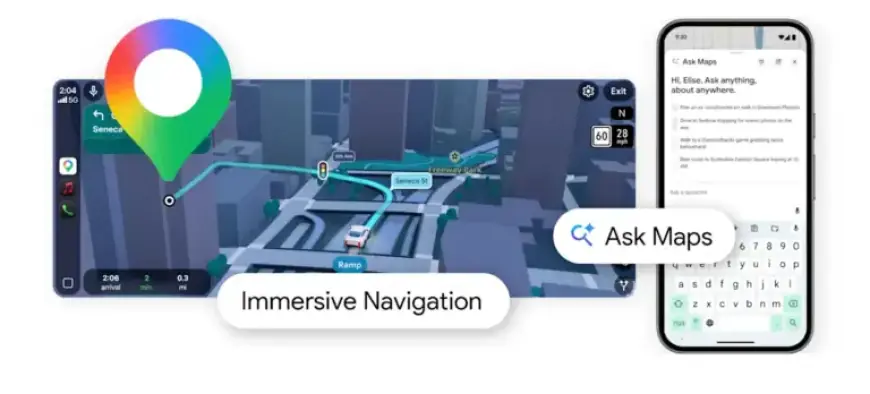
The latest update introduces a feature called “Immersive Navigation,” which brings a 3D rendering of the environment surrounding drivers. This is the first major advancement in driving directions in nearly ten years.
Key Features of the Update
- 3D Map Rendering: Maps now provides a three-dimensional view, improving driver orientation.
- Enhanced Voice Guidance: The voice assistant offers more natural directions, making navigation easier.
- Alternative Route Insights: The app will highlight the pros and cons of taking different paths.
- Street View Preview: Users can preview their destination and receive parking recommendations.
- Ask Maps Feature: An AI-driven chatbot allows users to ask specific questions about their route or nearby amenities.
Driving Experience Improvements
The new 3D mapping feature aims to help drivers better understand their surroundings by providing depth to landmarks such as buildings and overpasses. Google’s advanced Gemini models facilitate this transformation by selectively rendering elements and minimizing distractions.
In addition to the visual upgrades, Google has refined its voice guidance. For instance, while driving on highways, users may receive updates akin to “go past this exit and take the next one,” which functions especially well in unfamiliar areas.
Alternative Routes and Planning Assistance
With this upgrade, Google Maps now offers detailed insights regarding alternative routes. Users will receive information such as travel time vs. traffic conditions, enabling informed decisions on their journey.
Before commencing a trip, users can also access a Street View preview of their destination, including suggestions for parking spots. This feature streamlines the planning process and enhances overall convenience.
Introducing Ask Maps
The Ask Maps icon allows users to engage with the app’s AI capabilities. By entering questions in natural language, users can receive personalized recommendations based on previous searches. For example, one might request a location to charge a phone while grabbing a coffee, a task that previously required extensive searches.
This interactive feature is a game-changer, making it simpler to act on suggestions, book restaurants, or save preferred locations.
Availability
Google has initiated the rollout of the new immersive driving experience across the United States, with plans for further expansion to Android and iOS devices, as well as support for CarPlay and Android Auto in the coming months. The Ask Maps feature is currently available on Android and iOS in the US and India, with future desktop support anticipated.














