

























Windows 11 Taskbar’s Internet Speed Test Links Directly to Bing, Not Native

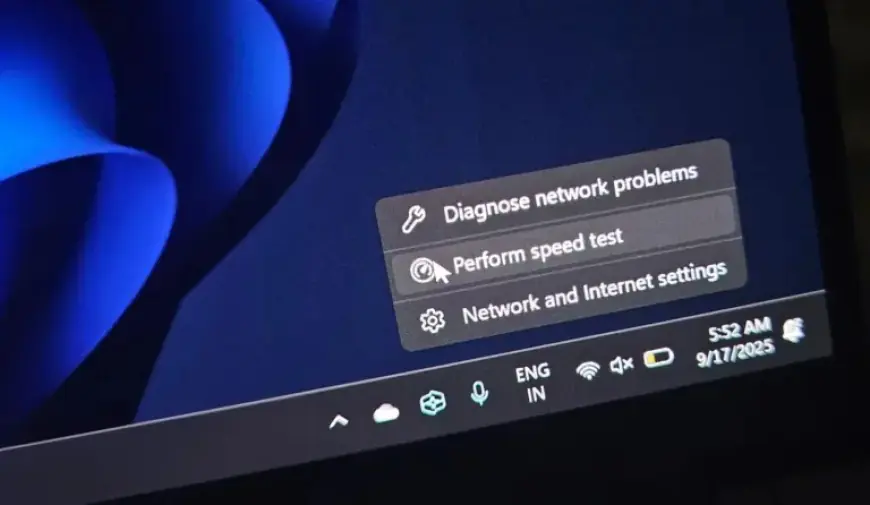
Microsoft, a leading tech giant valued in the trillions, has introduced a new feature in Windows 11: an Internet speed test tool that navigates users to Bing.com rather than providing a native option. This utility will roll out to users in stages, beginning with the March 10, 2026 Patch Tuesday update for Windows 11, which is focused on improving functionality.
Windows 11 Introduces Internet Speed Test Feature
The Internet speed test feature made its first appearance during the optional Windows 11 KB5077241 update, released in late February. Once fully rolled out, users will see a “Perform speed test” button when they right-click the Ethernet or Wi-Fi icon on their taskbar. Selecting this option opens the default browser and redirects to Bing.com with an internet speed test query.
Details of the Implementation
- The feature respects users’ default browser settings.
- The speed test tool provided by Bing effectively measures internet speed through file upload and download tests.
This tool stems from Microsoft’s partnership with SpeedTest, owned by Ookla, which recently came under Accenture’s ownership. The company previously had its own Azure-based speed test but transitioned to utilizing SpeedTest’s services.
Concerns Over Native Features
Critics argue that Microsoft should focus on developing native applications for essential functions rather than redirecting users to web pages. Users express frustration as similar features existed in the past, notably a dedicated Network Speed Test app for Windows 8. Released in 2013, this app provided detailed insights into network performance and user connectivity, with a more polished interface compared to the current Bing shortcut.
- The former app displayed connection type, network name, and internet status.
- It maintained a history of speed test results for user convenience.
Despite being a more resource-rich company today, Microsoft appears to be moving away from enhancing the Windows experience. Unlike past initiatives, there seems to be little intention to restore native features, causing disappointment among users who expect more from their operating system.
The Future of Windows Functionality
Currently, users cannot remove the “Perform speed test” option from their taskbar’s right-click menu. There are also no options to redirect this feature to alternative applications or websites. As Microsoft continues to innovate, it remains to be seen whether they will prioritize the development of native tools that meet user expectations.














