

























Apple’s New MacBooks Feature Noticeable Keyboard Change

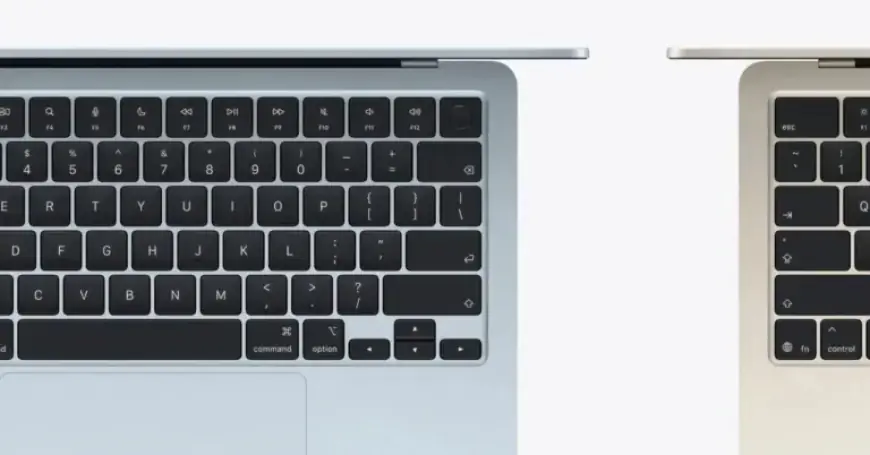
Apple has introduced its latest M5 MacBook Air and M5 MacBook Pro models, featuring improvements primarily centered around their new M5 chips. While their external design remains consistent with previous versions, a noticeable change lies in the keyboard layout.
Keyboard Change in New MacBooks
The most significant alteration in the latest MacBooks is the removal of text labels on certain keys. Instead of traditional text, Apple has opted for glyphs on keys such as:
- Tab
- Caps Lock
- Return
- Shift
- Delete
This shift aligns the MacBook keyboards more closely with international layouts and Apple’s iOS and iPadOS interfaces, which have utilized these glyphs for some time.
International Keyboard Standards
According to Dan Moren’s review on Six Colors, this change may surprise users in the United States who are accustomed to text labels. Globally, however, the use of glyphs has been a standard practice. This update signifies Apple’s commitment to an international design standard, likely extending to their standalone keyboards soon.
Retained Text Labels
While several text labels have been omitted, the MacBook Air still retains text on keys that include:
- Function
- Control
- Option
- Command
The presence of these text labels ensures some continuity for users during the transition.
User Reception
Reactions to the keyboard change are mixed. Some users appreciate the cleaner design and believe they can adapt easily. Others, however, feel that the text labels provided helpful guidance, especially for those switching from PC to Mac.
The M5 MacBook Air and M5 MacBook Pro models are designed to appeal to a broad audience. Despite the shift in keyboard design, many users are expected to adjust to the new glyph-only layout with little difficulty.
What are your thoughts on this keyboard update? Share your comments with us at Filmogaz.com.














