

























Modern Task Scheduler App Highlights Missing Features in Windows 11

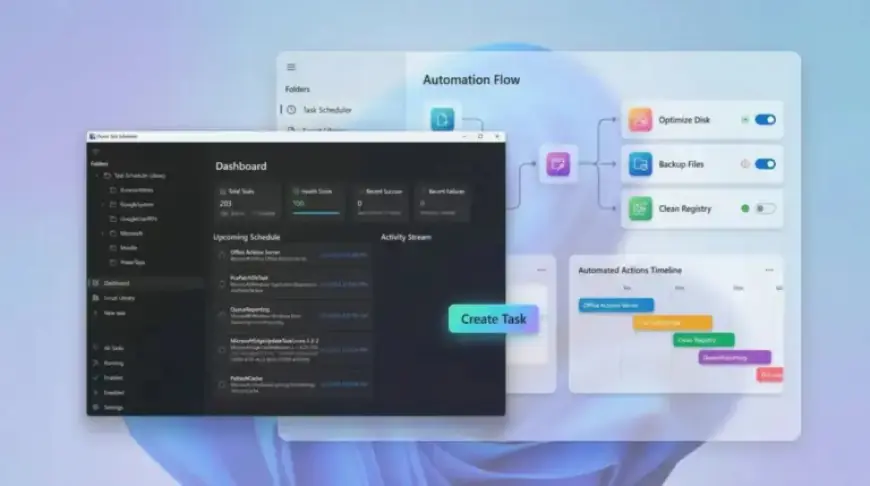
The Task Scheduler in Windows 11 has not seen significant updates in years, making it less appealing for modern users. While Microsoft has revamped many aspects of the Windows operating system, this essential utility has remained largely unchanged. In contrast, an independent developer has created FluentTaskScheduler, a modern alternative designed to improve the user experience.
Introducing FluentTaskScheduler: A Modern Task Scheduler App
FluentTaskScheduler is an innovative, open-source tool that reimagines task scheduling in Windows. Built with WinUI 3 and .NET 8, this app operates using the existing Task Scheduler API. It boasts a sleek, user-friendly interface and enhanced features that elevate task management.
Key Features
- User-Friendly Dashboard: The app offers a central dashboard that displays live activity streams, task history, and search capabilities.
- Simplified Task Creation: Users can effortlessly set up tasks with time-based triggers, system events, and advanced scheduling options.
- Comprehensive Monitoring: The application enhances visibility, making it easier to track task activity without navigating complex menus.
- Robust Trigger Support: Similar to the default Task Scheduler, FluentTaskScheduler provides extensive trigger options in a more streamlined approach.
Advanced Automation Controls
FluentTaskScheduler offers advanced features for users needing intricate automation setups. Users can define repetition patterns, specify task execution times, and integrate fail-safe behaviors. This functionality is ideal for both casual users and those operating in high-demand environments.
Efficient Script Management
One standout aspect of FluentTaskScheduler is its built-in Script Library. Instead of embedding scripts in individual tasks, users can manage reusable PowerShell scripts centrally. This reduces redundancy and simplifies task management. However, during testing, adding new scripts proved somewhat unclear, indicating room for improvement.
Integration and Usability
FluentTaskScheduler integrates well with Windows 11. It supports System Tray functionality, startup execution, and notifications for task completions or failures. The app’s command-line interface also allows for headless task management, appealing to more technical users.
Available Commands
FluentTaskScheduler provides several command-line options, including:
- List all tasks as JSON:
FluentTaskScheduler.exe –list - Run a specific task:
FluentTaskScheduler.exe –run “TaskName” - Enable or disable a task:
FluentTaskScheduler.exe –enable “TaskName”/–disable “TaskName” - Export task history:
FluentTaskScheduler.exe –export-history “TaskName” –output “C:logshistory.csv”
Final Thoughts
FluentTaskScheduler is a promising solution for users seeking a modern task scheduler app on Windows 11. While it successfully addresses many deficiencies found in the native Task Scheduler, enhancements in usability and functionality would elevate its standing as a must-have tool. As it stands, it serves as a refreshing alternative that aligns more closely with the modern design sensibilities of Windows 11. Users looking for intuitive task automation will find this app worth exploring.
For more insights and updates on software tools like FluentTaskScheduler, visit Filmogaz.com regularly.












