

























Google Docs Launches Gemini-Powered Audio Summaries

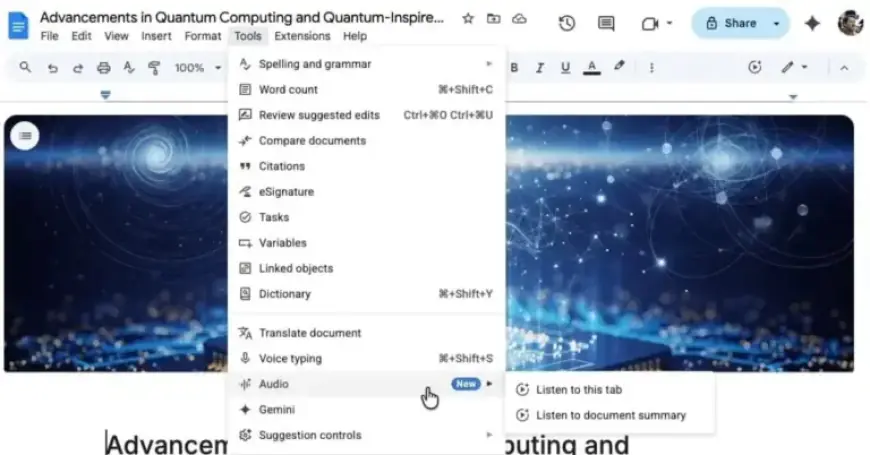
Google is enhancing Google Docs with a new feature: Gemini-powered audio summaries. This innovation allows users to quickly access audio versions of document summaries, improving productivity and efficiency.
Launch of Audio Summaries
Following the introduction of text-to-speech in August, the audio summaries feature is now becoming available. Users can find this new option under the Tools menu by selecting “Audio.” Here, they will locate “Listen to this tab” along with the recently added “Listen to document summary.”
Audio Player Features
The audio player includes several user-friendly features:
- A timeline scrubber for easy navigation.
- Playback speed controls ranging from 0.5x to 2x.
- Choice of different voices, such as narrator, persuader, and coach.
Key Benefits of Audio Summaries
Powered by Gemini, these audio summaries deliver concise verbal overviews of document contents, including multiple tabs. Typically lasting just a few minutes, they use a natural speaking style, allowing users to quickly catch up on essential information.
Practical Use Cases
These summaries can be particularly beneficial in various scenarios:
- Review notes before meetings.
- Summarize lengthy reports into key highlights.
Availability and Access
The roll-out of audio summaries is set to occur over the coming weeks and will be available for specific subscription levels:
- Business Standard and Plus
- Enterprise Standard and Plus
- Google AI Ultra for Business add-on
- Google AI Pro for Education add-on
- Google AI Pro and Ultra
With the addition of Gemini-powered audio summaries, Google Docs is paving the way for more efficient document management and review. This feature exemplifies how technology can help streamline workflows for users.