

























Gemini Tools Menu Unveils Labs Section, Personal Intelligence Feature

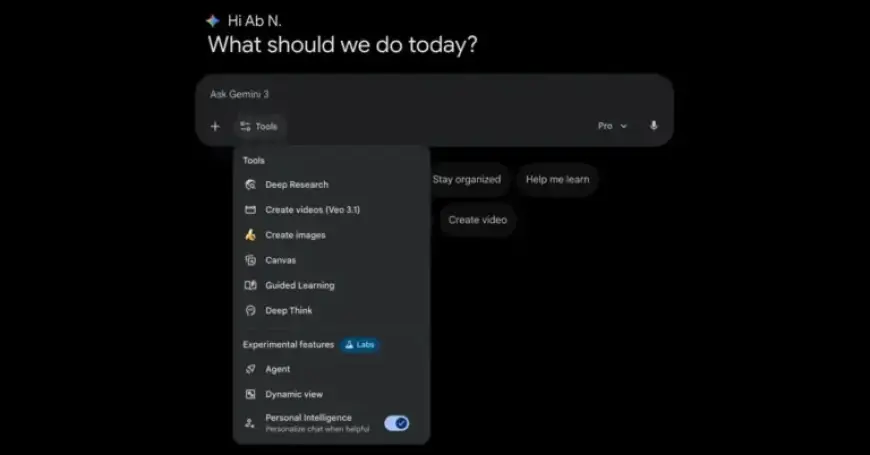
Google’s Gemini app continues to evolve as it enhances the organization of its Tools menu. With the introduction of the Experimental Labs section, users can now access features more systematically. Previously, the Tools menu consisted of a lengthy list of up to eight items, depending on the user’s AI subscription.
New Structure of the Tools Menu
The updated Tools menu on gemini.google.com is now divided into two categories. These include:
- Tools:
- Deep Research
- Create Videos (AI Plus)
- Create Images
- Canvas
- Guided Learning
- Deep Think (AI Ultra)
- Experimental Features:
- Agent (AI Ultra)
- Dynamic View or Visual Layout (available to all users)
- Personal Intelligence (available to all paid users)
The Experimental Features section is marked with a “Labs” icon, indicating which capabilities are stable and which are still under development.
Introducing Personal Intelligence Feature
Among the new features is the Personal Intelligence toggle, which allows users to personalize their chat experience. This functionality enables Gemini to integrate with connected apps effectively. It saves time by recognizing when a user’s prompt does not require regeneration.
Notably, the Personal Intelligence feature applies only to the current conversation. The toggle will reset automatically when a new chat session begins. As of now, users can access these updates on the Gemini web app, though they are not yet available on mobile platforms.
Conclusion
Google’s continued innovation with Gemini aims to improve user experience through structured tools and personalized features. The introduction of the Labs section highlights the company’s commitment to enhancing their AI capabilities while keeping users informed about which functions are stable versus those still in development.














