

























Is Updating Your Mac’s Pages, Numbers, Keynote, and Freeform Worth It?

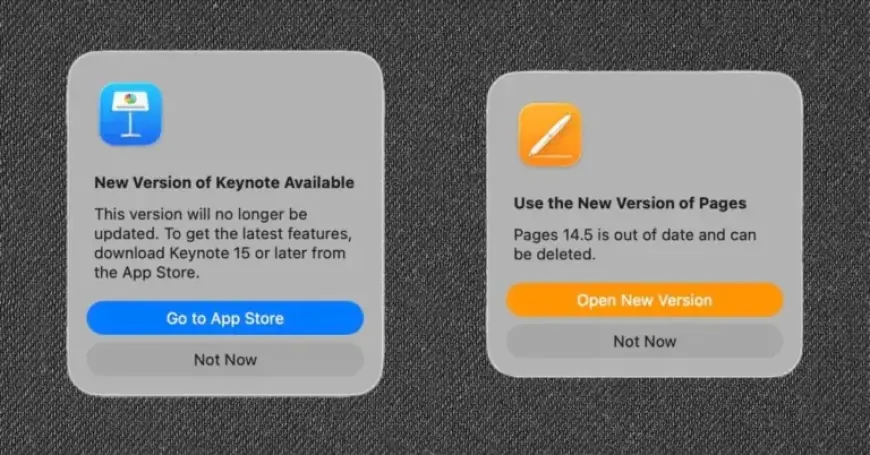
The launch of Apple Creator Studio (ACS) has stirred up mixed feelings among Mac users concerning the updates to Apple’s productivity apps. Users of Pages, Numbers, Keynote, and Freeform face a decision: should they embrace the update or stay with the original versions?
Understanding the Update Prompt
Upon opening any of Apple’s productivity applications, users are greeted with a prompt urging them to update to the new freemium ACS version. There is a strong emphasis indicating that updating is essential.
Users should note that the core functionality of these apps will remain free, according to Apple. However, skepticism exists among some users regarding the company’s commitment to this promise.
Concerns About Forced Subscription
There are rising fears that users who update may eventually be pressured into subscribing to continue using essential features. As one user pointed out, historical behavior from corporations raises doubts about their assurances. This skepticism is compounded by the installation process, which may prompt users to delete the original apps.
Safe Installation Process
After testing the update, it has been confirmed that the original versions will not be removed during the installation of ACS. Users can maintain both the original and updated versions on their Mac. In the Applications folder, both versions will display the same names, but they will exist in different locations.
Choosing Between Versions
- Invasive Subscription Prompts: The ACS version prominently promotes subscription options, which some users find intrusive.
- User Interface Changes: The interface of Pages has notably changed from version 14.5 to 15, which could impact user experience.
For users uncertain about the new interface, retaining the original apps offers a safety net. While the ACS version may present some appealing features, reverting to the original application is always an option if the new user experience is unsatisfactory.
Conclusion: Is Updating Worth It?
In conclusion, the recommendation for users is to accept the invitation to update while keeping the original apps installed. This strategy allows users to explore new features without losing access to their familiar tools. The transition may offer innovative capabilities, but the choice to revert remains a prudent safety measure.