Explore Xbox Cloud Gaming’s New Web Experience — Now in Public Preview

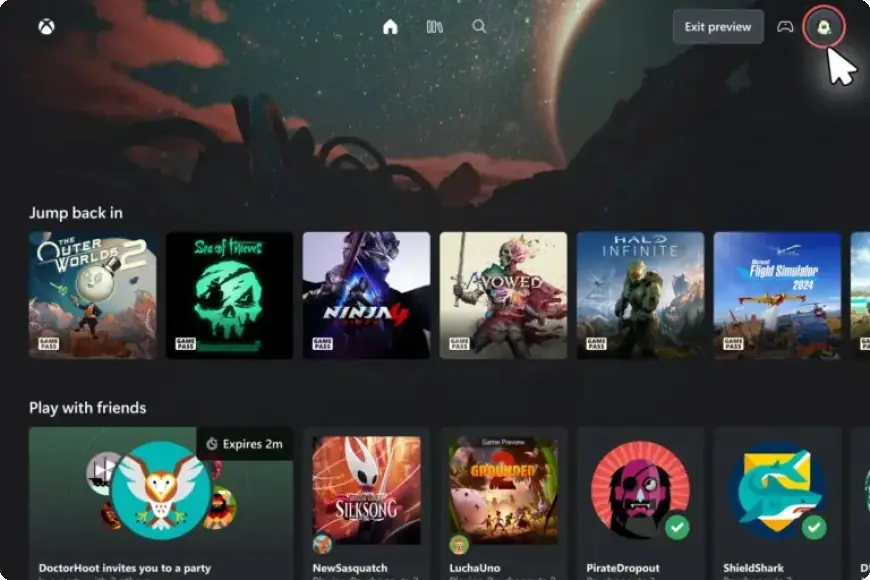
Today marks the beginning of a public preview for Xbox Cloud Gaming’s newly refreshed web experience. This initiative aims to enhance the overall experience for players by introducing a redesigned interface and improved navigational features. Users who participate in this preview will enjoy an updated look that lays the groundwork for future developments in cloud gaming.
Overview of the New Web Experience
The public preview allows players to explore a modernized website tailored for Xbox Cloud Gaming. While testing this preview, users may notice several changes:
- Updated navigation features for ease of use
- A fresh aesthetic to enhance the visual experience
- Potential variations in functionality compared to the current setup
As this is a preview, some features may still be under development or may function differently from what users are accustomed to.
How to Access the Preview
To access the new Xbox Cloud Gaming experience, follow these steps:
- Visit xbox.com/play using a compatible browser.
- Log in with your Xbox Account.
- Navigate to Settings and enable the Preview Features toggle.
- Launch the new experience by either following prompted links or entering play.xbox.com directly into your browser.
Note that after enabling the toggle, it may take up to 10 minutes for the new prompts to appear. Logging out and back in may speed up this process.
Providing Feedback
The feedback from users is crucial for validating the new platform. Players are encouraged to share their experiences, report issues, or provide suggestions using the Feedback feature located within the new interface. There are two primary methods for submitting feedback:
- Select the profile icon in the top right corner and choose “Give Feedback.”
- Open the Guide using the Xbox button on your controller and select “Give Feedback.”
Your input will significantly influence future updates and improvements to the Xbox Cloud Gaming web experience.
Support and Community Engagement
Xbox Insiders seeking assistance or wishing to connect with the community can join discussions on the Xbox Insider subreddit. Official staff and fellow users often provide support and contribute to various topics. To stay updated with the latest information, follow @XboxInsider on X (formerly Twitter).
Thank you for participating in this public preview. Your feedback is invaluable in shaping the future of Xbox Cloud Gaming.