

























Microsoft Paint Introduces AI-Powered Coloring Book Feature

Microsoft has launched new AI-powered features in its Paint and Notepad applications within Windows 11. These updates are currently available to Windows Insiders using the Canary and Dev channels. The enhancements include advanced functionalities that are surprisingly applicable for basic apps.
AI-Powered Coloring Book Feature in Paint
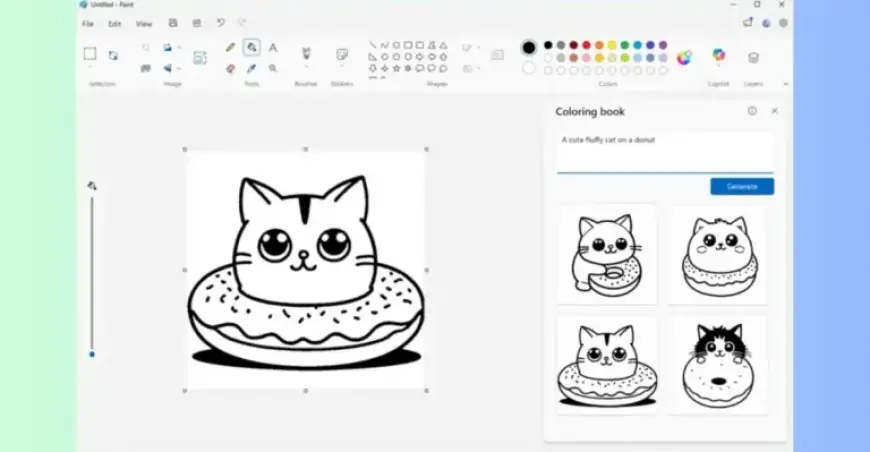
One standout addition is the “Coloring book” feature in Microsoft Paint. This functionality allows users to create blank coloring templates based on simple text prompts. The feature is accessible in version 11.2512.191.0 of Paint.
How the Coloring Book Feature Works
- Select the “Coloring book” option from the Copilot menu in Paint.
- Input a description of the desired illustration, such as “a cute fluffy cat on a donut.”
- Paint will generate four design variations for you to choose from.
Once users select a design, they can color the image using Paint or print it to create a physical coloring page. However, this feature is currently only available on Copilot Plus PCs, indicating Microsoft’s strategy to enhance the market appeal of their AI-equipped Windows 11 devices.
Improvements in Notepad
The Notepad application has also received significant improvements in its 11.2512.10.0 update. Users can now access AI-generated results for features like Write, Rewrite, and Summarize. This will provide quick previews without the need for a full wait time.
New Features and Enhancements
- A new welcome experience offers an overview of app functionalities.
- Support for additional Markdown syntax, including strikethrough formatting and nested lists.
These updates position Microsoft Paint and Notepad as innovative tools, leveraging AI to enhance user experience and creativity in digital art and text editing.