























1Password Enhances Phishing Protection with New Security Layer

1Password has launched a new feature aimed at bolstering phishing protection. This tool is specifically designed to confront the growing threats posed by AI-driven phishing scams. Its enhanced browser extension provides users with an additional layer of security when accessing login sites.
Concerns Over Phishing Scams
The rise of artificial intelligence has made it easier for scammers to create convincing phishing attempts. Unlike previous methods, which often featured clear indicators of fraud, such as spelling errors and poor graphics, AI allows for more sophisticated designs. As a result, phishing scams have become increasingly difficult to detect.
Statistics from Fortune reveal a troubling trend. Between 2024 and 2025, 60 percent of companies reported an uptick in fraud-related losses. This alarming increase emphasizes the need for robust security measures when handling sensitive information.
New Phishing Protection Feature
The latest feature from 1Password acts as a “second pair of eyes.” This functionality helps users identify fraudulent websites prior to inputting their login credentials. While 1Password already had a built-in measure to avoid autofilling credentials on suspected phishing sites, the new addition addresses a crucial vulnerability.
How It Works
- Once activated, the browser extension monitors sign-ins for suspicious activity.
- The feature identifies when a user attempts to paste login information into a site that is not linked to 1Password.
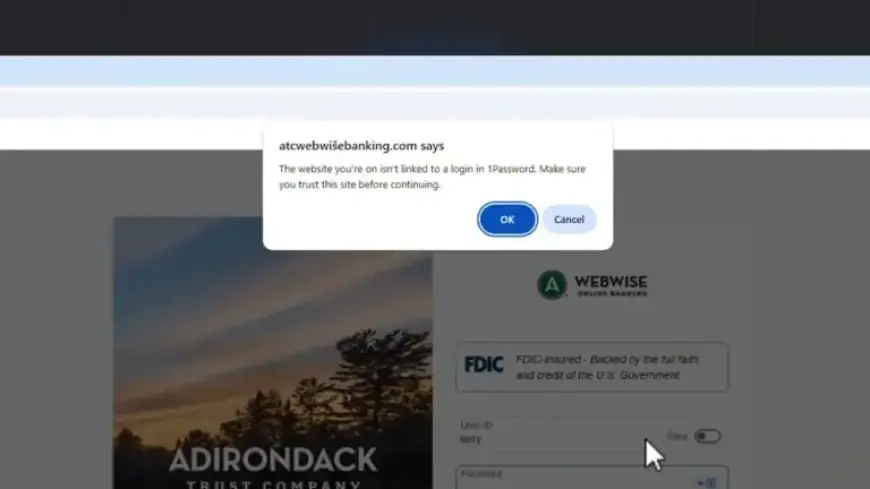
This process generates a warning pop-up. It will inform the user that the website lacks a trusted login. The warning reads: “The website you’re on isn’t linked to a login in 1Password. Make sure you trust this site before continuing.”
Importance of User Awareness
The goal of this feature is to create a moment of pause for users. According to 1Password, this brief interruption can be crucial in preventing potential security breaches. By integrating this extra layer of caution, users can rethink their actions before unwittingly compromising their login details.
How to Enable the Feature
- Open the 1Password browser extension.
- Navigate to the settings menu.
- Locate the Notifications section and activate “Warn about pasted logins on non-linked websites.”
This new phishing protection feature is now available for users. By taking advantage of this enhancement, individuals can better safeguard their personal and financial information from ever-evolving phishing threats.