Colorize and Restore Old Photos Using Generative AI

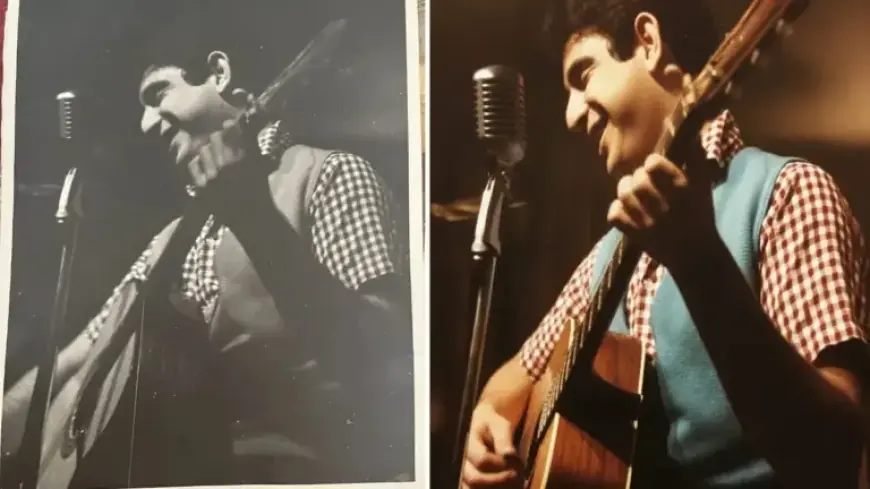
Old photographs and family memorabilia often carry sentimental value. However, many of these cherished images remain untouched in drawers for years. With advancements in technology, particularly with generative AI, breathing new life into these memories is now easier than ever.
Colorize and Restore Old Photos Using Generative AI
Restoring and colorizing old photos has traditionally required artistic skill and technical expertise. Fortunately, generative AI tools simplify this process, allowing anyone to enhance their photographs with minimal effort. This guide explores how to effectively use such tools for your old images.
Step 1: Digitize Your Memories
- Scanning is the cleanest method to digitize old photos.
- If scanning isn’t an option, use a camera to take well-lit photos of your images.
Step 2: Choose the Right AI System
Several AI tools excel in colorizing and restoring old photos. Adobe Firefly is noteworthy for its integration with Photoshop. It can easily handle restoration tasks while offering advanced capabilities for further editing.
Step 3: Upload Your Photos
For the best results, upload photos one at a time. This step allows for more precise adjustments. Older pictures, often damaged by time, require careful attention during editing.
Step 4: Provide Specific Instructions
Ensure you are detailed in your prompts. Indicate specific issues like dark spots, cracks, or water damage that need addressing. For instance, specify if you want to exclude certain text from the final image, as AI may not interpret restoration correctly on its own.
Step 5: Make Necessary Refinements
AI-generated results may not always be perfect. Be prepared to refine your images by providing additional instructions. It’s vital to guide the AI adequately to achieve the desired outcome.
Step 6: Monitor Changes
Keep an eye on unexpected modifications. AI may alter original formats or make unwarranted adjustments. Specify your preferences, such as maintaining the original aspect ratio to avoid surprises.
Step 7: Approach in Stages
If a photo is severely damaged, it’s advisable to tackle the restoration process in stages. Start by enhancing lighting and removing blemishes before applying colorization. This methodical approach yields better results.
Conclusion
Generative AI provides an invaluable tool for those looking to revitalize their old photographs. By following these steps, you can restore and colorize treasured memories, ensuring they remain a part of your family’s legacy.