

























Capture Stunning Northern Lights Photos with Your Android Phone

The Northern Lights, also known as the aurora borealis, have recently captivated many in the Northern Hemisphere due to significant geomagnetic storms. These storms bring stunning displays of light, often visible in regions where they are rarely seen. This guide focuses on capturing breathtaking photos of the Northern Lights using Android smartphones, particularly the Google Pixel.
Understanding the Northern Lights
The aurora borealis is caused by solar storms and charged particles interacting with the Earth’s atmosphere. Typically, this phenomenon is more common in higher latitudes, but recent strong solar activity has expanded visibility to parts of the United States.
Equipment Needed for Capturing the Northern Lights
- A tripod to stabilize your phone.
- A dark environment with minimal light pollution.
How to Capture Stunning Photos with Your Android Phone
To effectively photograph the Northern Lights, follow these steps:
Steps for Google Pixel Users
- Mount your Google Pixel on the tripod.
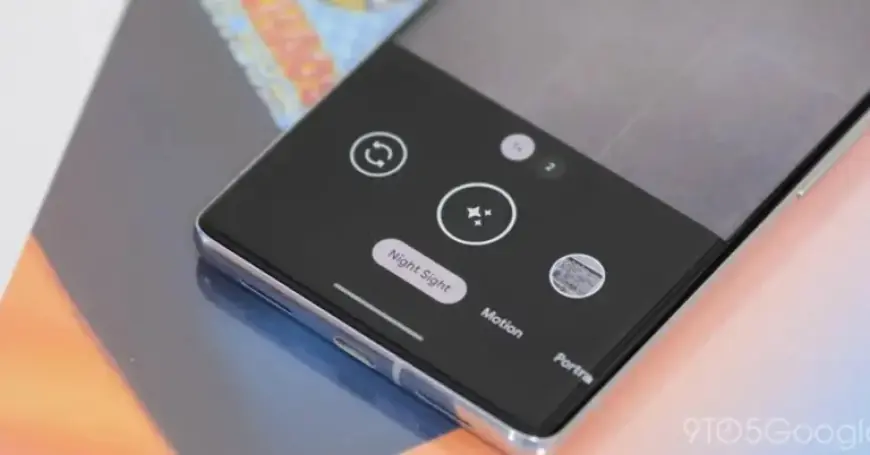
- Open the camera app and select “Night Sight” mode from the bottom bar.
- If the auroras are visible, simply use Night Sight to take your photo.
- For enhanced detail, switch to astrophotography mode by keeping the phone steady until the star icon appears on the shutter button.
- Tap the shutter button to start the capture, which may take up to 4 minutes.
Using Other Android Devices
If you’re using smartphones like Samsung Galaxy, they may switch to night mode automatically in low light. Here’s how to achieve the best results:
- If the aurora is visible, enable the standard night mode.
- If visibility is low, access manual settings to select long exposure options. You can find this under “Night” mode by changing to “Max” exposure or in “Pro” mode by setting the speed to 5 or 6 seconds.
Share Your Photography
If you successfully capture stunning Northern Lights photos with your Android phone, consider sharing your images in the comments. Documenting this majestic display can be a rewarding experience.
For more guides on photography and Android tips, stay connected with Filmogaz.com. Follow us across various social media platforms for updates and additional content.