

























Unlock Windows’ Secret ‘God Mode’ Folder for Centralized Settings Access

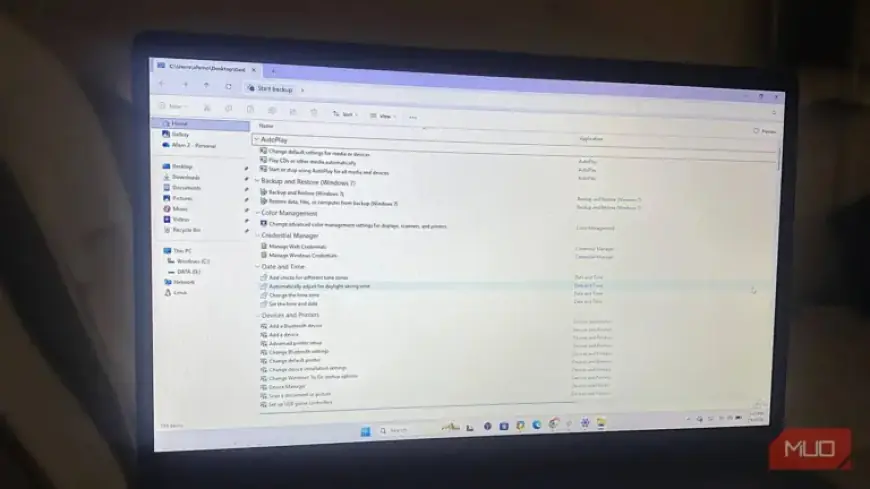
Managing settings on Windows can often be frustrating, as they are located in various places across the interface. Thankfully, the God Mode folder offers a solution by centralizing access to numerous settings in one convenient location. This folder acts as a master index, allowing users to quickly search and find all adjustable settings in a single list.
What is the God Mode Folder?
The God Mode folder is not an administrative privilege but rather a simple shortcut. It uses a Class Identifier (CLSID) string, specifically {ED7BA470-8E54-465E-825C-99712043E01C}, to point to Windows’ internal settings catalog. This catalog aggregates around 200 to 240 settings, depending on the Windows version in use, streamlining access to typically scattered options.
How to Create the God Mode Folder
Creating the God Mode folder is a straightforward process:
- Right-click on your desktop and select “New” followed by “Folder.”
- Rename the folder to GodMode.{ED7BA470-8E54-465E-825C-99712043E01C}. You can customize the label before the period, but keep the CLSID unchanged.
Upon renaming, the folder icon will change to resemble a Control Panel icon, transforming it into a virtual container. Remember, once created, you cannot rename this folder without deleting and recreating it.
The Benefits of God Mode
The primary advantage of God Mode is its ability to reduce the complexity of navigating Windows settings. For instance, if users need to adjust the mouse pointer speed, they traditionally would navigate through several menus. In God Mode, they can simply search for “pointer speed” and access the option instantly.
Frequently Accessed Settings
- Password Reset Disk Creation: This option isn’t readily available in the Settings app, making God Mode invaluable.
- Display Calibration: Users can quickly find this setting by searching for “calibrate.”
- Performance Options: Users can easily access these settings without navigating through complex menus.
The alphabetical organization of settings within God Mode allows users to discover features that they might not have known were available, enhancing their experience on Windows.
Using God Mode Effectively
While God Mode is excellent for locating various settings, it does not replace the Settings app for everyday tasks. For actions such as adjusting volume or screen brightness, the Settings app remains more suitable. God Mode is particularly helpful for troubleshooting unfamiliar systems or setting up new devices.
Ultimately, both the God Mode folder and the Settings app serve essential roles in managing Windows efficiently. By utilizing both tools, users can enjoy a smoother experience while navigating their operating system.